Threaded comments
http://support.google.com/blogger/bin/answer.py?hl=en&answer=1725597 Here is the link.
Single level commenting allows a reader to post a comment to a post. Threaded commenting allows a reader to reply to other reader comments on that post. Blogger supports threaded commenting with two levels -- the original comment, and the replies to that comment.
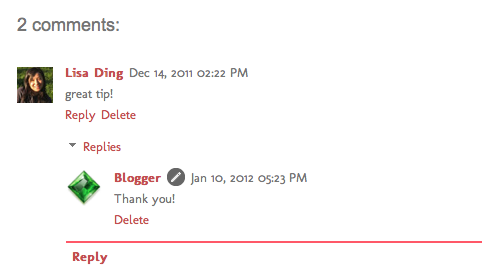 For example, let's say that Fred reads Julie's baking blog, and comments on a post she wrote about chocolate lava cake, suggesting that it tastes great with raspberries. Sarah, another reader of Julie's blog and also a huge fan of raspberries, wants to reply directly to Fred. With 2-level commenting, Sarah can click "Reply to this comment" directly under Fred's text, and respond to him. Anyone else interested in responding to Fred's comment can do so as well, adding onto the second tier of comments. For example, let's say that Fred reads Julie's baking blog, and comments on a post she wrote about chocolate lava cake, suggesting that it tastes great with raspberries. Sarah, another reader of Julie's blog and also a huge fan of raspberries, wants to reply directly to Fred. With 2-level commenting, Sarah can click "Reply to this comment" directly under Fred's text, and respond to him. Anyone else interested in responding to Fred's comment can do so as well, adding onto the second tier of comments.Enabling threaded commenting If you have commenting enabled on your blog, then threaded commenting will work provided you have your blog feed set to "Full," and have chosen the “Embedded" option as opposed to “Full page” or “Popup window.” To change your commenting settings, just go to the Comments section under Settings | Posts and comments. The setting to change your blog feed can be found under Settings | Other. Notifications A threaded commenting system means more discussion and back-and-forth dialogue. If you’d like to be notified of any updates to a discussion, just click “Follow by email” to subscribe to the thread. This way, you’ll be notified via email so you can keep up with the conversation. Keep in mind that this is a different subscription than the “Follow by email” gadget used to follow another blogger’s blog posts.
updated 01/11/2012
|
Showing posts with label Tips. Show all posts
Showing posts with label Tips. Show all posts
Sunday, March 4, 2012
How to enable reply on your blogs. Per Blogger so you can reply to those wonderful comments.


Saturday, June 11, 2011

Sunday, January 9, 2011
How to number those wonderful comments on your post.
Has anyone ever wanted there comments numbered? I know I have. I can't stand picking a winner with random.org, getting my result and trying to count through a hundred or more comments trying to find my winner. This code does work. I hope you find it helpful for you. It is for blogger.
Add the (ADD HTML) gadget under the blog post part of your blog. See PICTURE

Add this code to the gadget
This code will number your comments. Click HERE for the Code For some reason I can't post the code on my post so go to the link where I found it. http://www.google.com/support/forum/p/blogger/thread?tid=001b20a62a7ef7a7&hl=en HUGS, Meighen
Add the (ADD HTML) gadget under the blog post part of your blog. See PICTURE

Add this code to the gadget
This code will number your comments. Click HERE for the Code For some reason I can't post the code on my post so go to the link where I found it. http://www.google.com/support/forum/p/blogger/thread?tid=001b20a62a7ef7a7&hl=en HUGS, Meighen
Tuesday, January 4, 2011
Cricut Tips Tricks and Settings

Wednesday, October 13, 2010
Tuesday, September 28, 2010
Making your Cricut mat sticky again
Here is a way to reuse your mat over and over using the Crafting Companion Stick Away Spray and the Crafting Companion Stick and Spay Prepositional Adhesive. Hope this helps my fellow crafting community. Click on the name of the item to head over to Custom Crops web site.
♥HUGS♥,

♥HUGS♥,

Monday, September 27, 2010
My new craft organizer came in today. WooHoo
This thing is awesome and cheaper than Stampin Up and has more containers. Enjoy the video. You get to see my ugly mug. lol Just got home so I am not as fresh as in the morning. lol Make up is worn down and I look pooped. hehe
HUGS,
HUGS,
Thursday, April 8, 2010
Wednesday, March 31, 2010
Subscribe to:
Posts (Atom)